My Device is 4K But Why Does My Footage Look Like a VHS Recording
So, you went on Amazon and bought that 4K camera that was at a discounted price? Say around 150.00 to 300.00 bucks. Let me guess, the picture it’s not what you expected. Of course it’s not. What world do you live in where high quality is offered at discount prices. Buy your camera equipment like you are buying clothing. Are you going to take that Old Navy T-shirt made inexpensively that will probably last you a year or are you going to buy that Hugo Boss at full price because it’s going to last you a lifetime and made of high quality materials? 4K recording devices are manufactured in the same context.
Although it says 4K, it doesn’t mean you are going to get that flawless Demo Video you saw playing on the TV at Costco. Unfortunately, as with any electronic technological advancement there are variations in 4K recordings. I know, why can’t everything simply just have one standard? Life would be so much simpler. (But what about my status?) These variations occur because “4K” is only a resolution standard (the number of pixels) that displays on a screen. However, it does not include a guarantee or a standard of image quality. Hopefully it will be included in your warranty or return policy, because you just may want it and use it. A digital recording’s appearance is primarily influenced by technical specs, hardware capabilities, and how the data is processed. Goodbye Kodak celluloids! (No digital recording can ever measure up to a celluloid exposure, but it’s getting close)
Even though recording devices may say that they can record in 4K, 4K really has no recording standard other than delivering a pixel display of 3840 x 2160. This doesn’t account for the quality of the image, the amount of data captured, or how it is processed (is it compressed or not compressed). I know, just more shit to know! Even when two devices record at the same 3840×2160 or 4096×2160 resolution, otherwise known as UHD or 4K, the resulting footage can differ significantly due to factors like bitrate, sensor quality, compression, blah blah blah. Stuff you probably know nothing about, or even more so, care, lol.
Below are a bit more detailed explanations that may give a better understanding of what to look for if you want a good quality 4K recording device. Follow these tips, but the easiest thing to do is just simply expect to pay around $400.00 minimum.
Differences in Resolution Standards
“4K” actually refers to two different standards:
- 4K UHD (Consumer): Used in TVs and monitors with a resolution of 3840 x 2160 pixels.
- DCI 4K (Cinema): Used in film and video production with a wider resolution of 4096 x 2160 pixels. [3, 8, 9]
Here are the primary reasons for variations in 4K recordings:
Bitrate and Compression
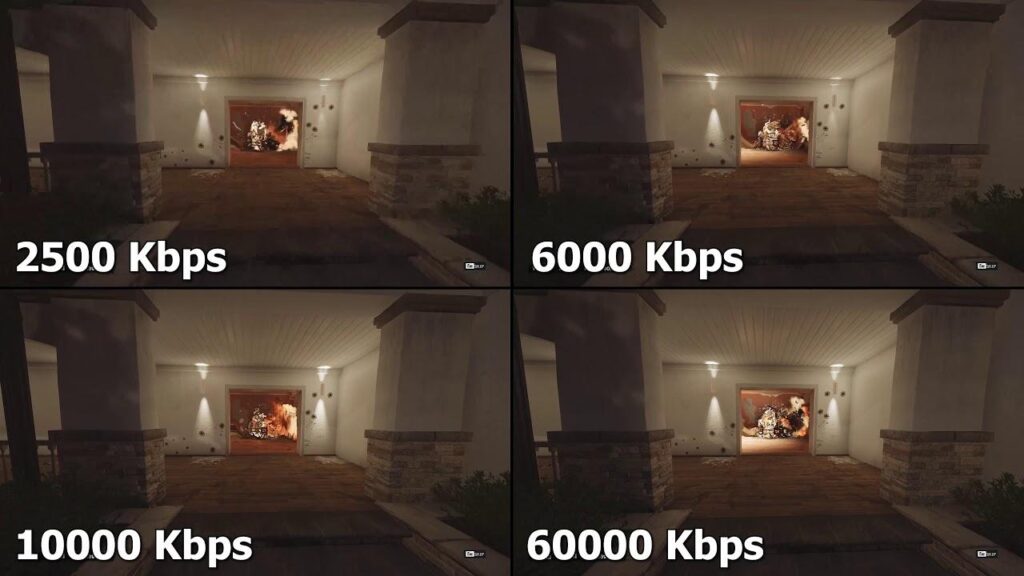
Bitrate (how much data is saved (recorded) per second) is typically more important than the resolution for the quality outcome of your video. [1] This is what you are going to want to look for if you are thinking about purchasing a device claiming to be 4K recording compatible. But be prepared to pay for it. Any discount device that costs any less than about $400.00, you are not going to get the ‘looking through a window’ detailing that 4K has the reputation of having.
- Bitrate and Video Compression: This is the biggest factor in the quality of 4K recording. A high bitrate, 400 Mbps (higher quality) means less compression and more detail that can be delivered from a high end camera or recording device. A low bitrate, such as from a discounted 4K recording device or low end phone camera, might record at 20-50 Mbps (lower quality) meaning heavy compression is given to the recorded image and typically less quality of an image. Think about those old Blackberry cameras or when digital cameras first came out. You wanted to get more pictures, so you lowered the quality of the pictures taken.
- High Bitrate: A professional camera should record at 400Mbps or more, preserving fine details.
- Low Bitrate: A cheap action camera or smartphone that record at around 20Mbps, give or take. The visual results will be in “blocky” artifacts or loss of detail in complex scenes like moving water or leaves.
- Streaming vs. Physical: Streaming services like Netflix compress 4K heavily to save bandwidth, while 4K Blu-ray discs offer much higher bitrates and better clarity.
Of course there are plenty of other factors to consider, but I’ll get into more depth with those subjects later. In the meantime, here is a debriefing of some of them.
- Sensor Size
- Lenses
- Processing Power
- True 4K vs. Upscaled 4K
- Chroma Subsampling (Color)
- Frame Rates
- Frames Per Second (FPS)
- Compression Efficiency
- Color and HDR
- Lighting Conditions
- Color Grading
- HDR (High Dynamic Range)
Ready to give up yet? Don’t. These are significant factors to consider so just stand up to the challenge. They’re easy to figure out and can actually be interesting, if you’re serious about digitally recording.